IMAS-Python 5 minute introduction
Verify your IMAS installation
Before continuing, verify that your imas install is working. Check the Installing IMAS-Python page for installation instructions if below fails for you. Start python and import imas. Note that the version in below output may be outdated.
>>> import imas
>>> print(imas.__version__)
2.0.0
Note
If you have an IMAS-Python install without the IMAS-Core, importing IMAS-Python will display an error message. You can still use IMAS-Python, but not all functionalities are available.
Create and use an IDS
To create an IDS, you must first make an IDSFactory
object. The IDS factory is necessary for specifying which version of the IMAS Data
Dictionary you want to use. If you don’t specify anything, IMAS-Python uses the same Data
Dictionary version as the loaded IMAS environment, or the latest available version. See
Using multiple DD versions in the same environment for more information
on different Data Dictionary versions.
>>> import imas
>>> import numpy as np
>>> ids_factory = imas.IDSFactory()
18:23:12 INFO Parsing data dictionary version 4.0.0 @dd_zip.py:166
>>> # Create an empty core_profiles IDS
>>> core_profiles = ids_factory.core_profiles()
We can now use this core_profiles IDS and assign some data to it:
>>> core_profiles.ids_properties.comment = "Testing IMAS-Python"
>>> core_profiles.ids_properties.homogeneous_time = imas.ids_defs.IDS_TIME_MODE_HOMOGENEOUS
>>> # array quantities are automatically converted to the appropriate numpy arrays
>>> core_profiles.time = [1, 2, 3]
18:24:58 INFO     Assigning incorrect type 'int64' to <IDSNumericArray (IDS:core_profiles, time, empty FLT_1D)>, attempting automatic conversion. @ids_primitive.py:483
>>> # the python list of ints is converted to a 1D array of floats
>>> core_profiles.time
<IDSNumericArray (IDS:core_profiles, time, FLT_1D)>
numpy.ndarray([1., 2., 3.])
>>> # resize the profiles_1d array of structures to match the size of `time`
>>> core_profiles.profiles_1d.resize(3)
>>> len(core_profiles.profiles_1d)
3
>>> # assign some data for the first time slice
>>> core_profiles.profiles_1d[0].grid.rho_tor_norm = [0, 0.5, 1.0]
>>> core_profiles.profiles_1d[0].j_phi = [0., 0., 0.]
As you can see in the example above, IMAS-Python automatically checks the data you try to assign to an IDS with the data type specified in the Data Dictionary. When possible, your data is automatically converted to the expected type. You will get an error message if this is not possible:
>>> core_profiles.time = "Cannot be converted"
ValueError: could not convert string to float: 'Cannot be converted'
>>> core_profiles.ids_properties.comment = 1-1j  # automatically converted to str
>>> core_profiles.ids_properties.comment
str('(1-1j)')
Load and store an IDS to disk with IMAS-Core
Note
This functionality requires the IMAS-Core, until this library is openly available on GitHub you may need to fetch it from git.iter.org (requires to have an ITER account). Using IMAS-Core also enable slicing methods
get_slice(),put_slice()andget_sample()(with IMAS-Core>=5.4).If you can’t have access to it, you can save IDS to disk with the built-in netCDF backend Load and store an IDS to disk with netCDF
To store an IDS to disk, we need to indicate the following URI to the
IMAS-Core: imas:<backend>?path=<path_to_folder> or using the legacy query keys
imas:<backend>?user=<user>;database=<database>;version=<version>;pulse=<pulse>;run=<run>
which are then converted as a path ~user/public/imasdb/database/version/pulse/run.
Available <backend> may depend on your IMAS-Core install: hdf5, mdsplus,
ascii, memory, uda.
In IMAS-Python you do this as follows:
>>> # Create a new IMAS data entry for storing the core_profiles IDS we created earlier
>>> # Here we specify the backend, database, pulse and run
>>> dbentry = imas.DBEntry("imas:hdf5?path=./testdb","w")
>>> # now store the core_profiles IDS we just populated
>>> dbentry.put(core_profiles)
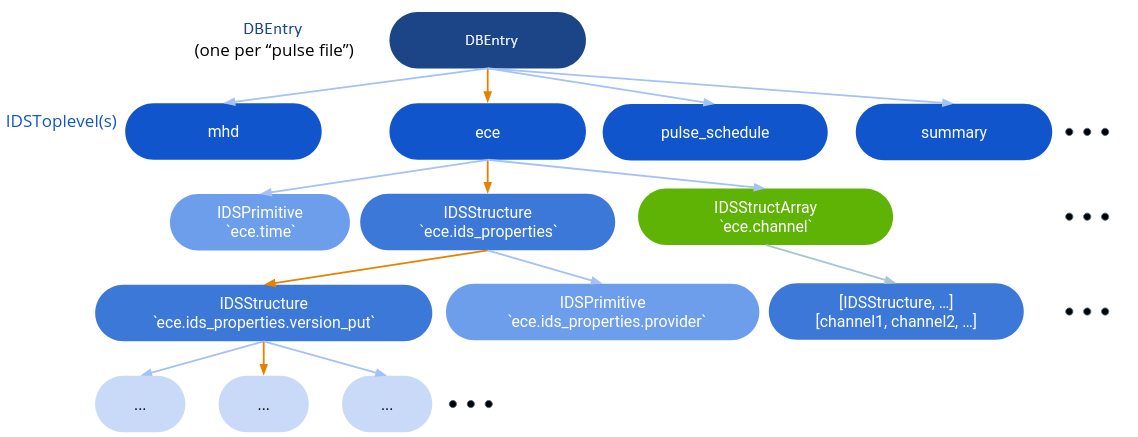
To load an IDS from disk, you need to specify the same information as
when storing the IDS (see above). Once the data entry is opened, you
can use <IDS>.get() to load IDS data from disk:
>>> # Now load the core_profiles IDS back from disk
>>> dbentry2 = imas.DBEntry("imas:hdf5?path=./testdb","r")
>>> core_profiles2 = dbentry2.get("core_profiles")
>>> print(core_profiles2.ids_properties.comment.value)
Load and store an IDS to disk with netCDF
In IMAS-Python you do this as follows:
>>> # Create a new IMAS data entry for storing the core_profiles IDS we created earlier
>>> # here we directly point to a .nc filename in your system
>>> dbentry = imas.DBEntry("mypulsefile.nc","w")
>>> # now store the core_profiles IDS we just populated
>>> dbentry.put(core_profiles)
To load an IDS from disk, you need to specify the same file information as
when storing the IDS. Once the data entry is opened, you
can use <IDS>.get() to load IDS data from disk:
>>> # Now load the core_profiles IDS back from disk
>>> dbentry2 = imas.DBEntry("mypulsefile.nc","r")
>>> core_profiles2 = dbentry2.get("core_profiles")
>>> print(core_profiles2.ids_properties.comment.value)